Hashing vs Encryption: What Every Developer Should Understand
You need to store user passwords. You reach for AES. Your database gets breached. Your users' passwords are now sitting in plaintext on a dark web marketplace. What went wrong?
You used encryption instead of hashing. The difference between the two is not academic; it is the difference between your users being safe after a breach and every single one of them needing to rotate credentials across every site they have ever used.
Let's unpack the critical distinction, look at how each operation works under the hood, and understand why password storage demands hashing, not encryption or "encryption with a secret key we keep safe."
The Core Difference: One-Way Versus Reversible
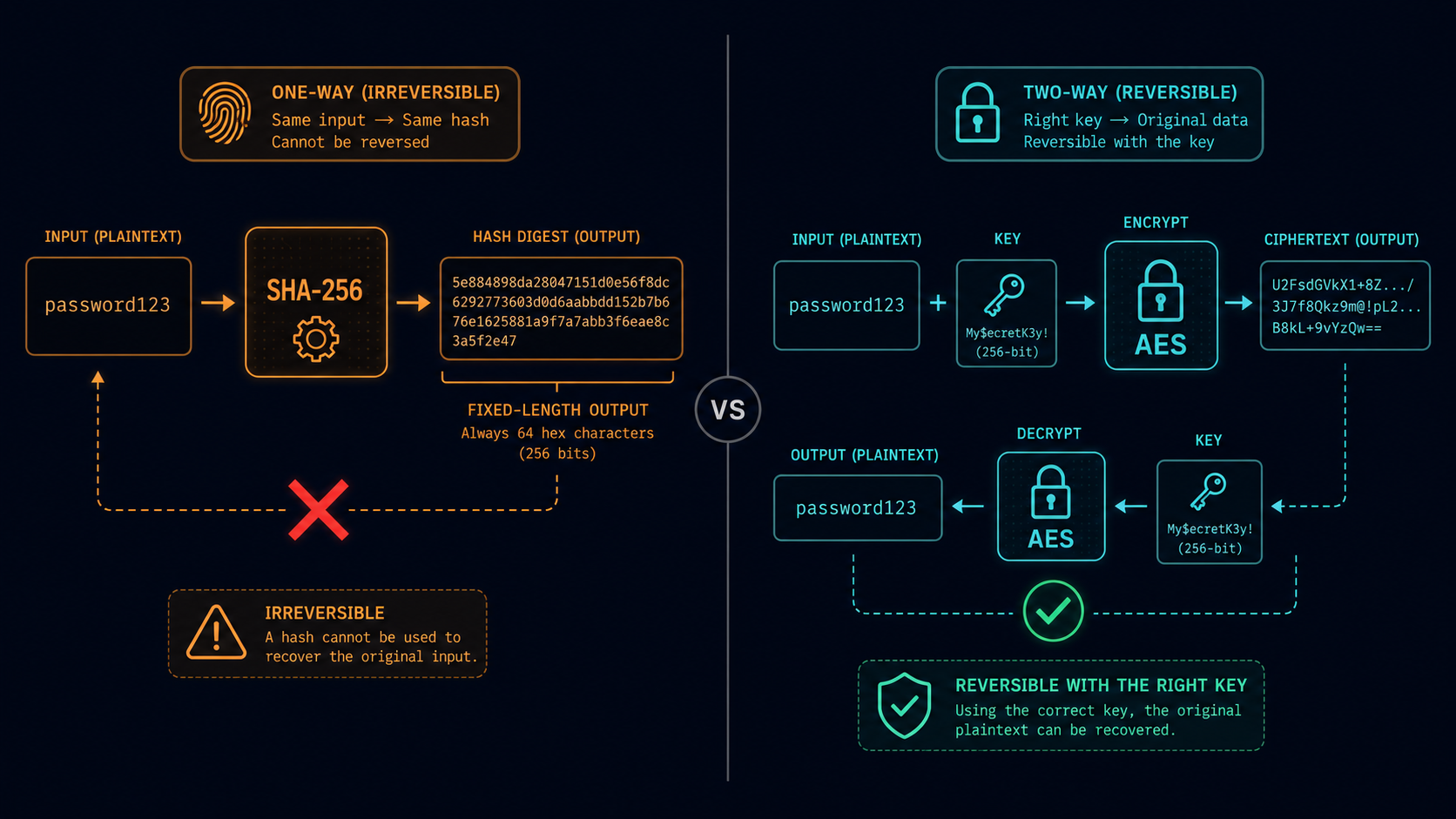
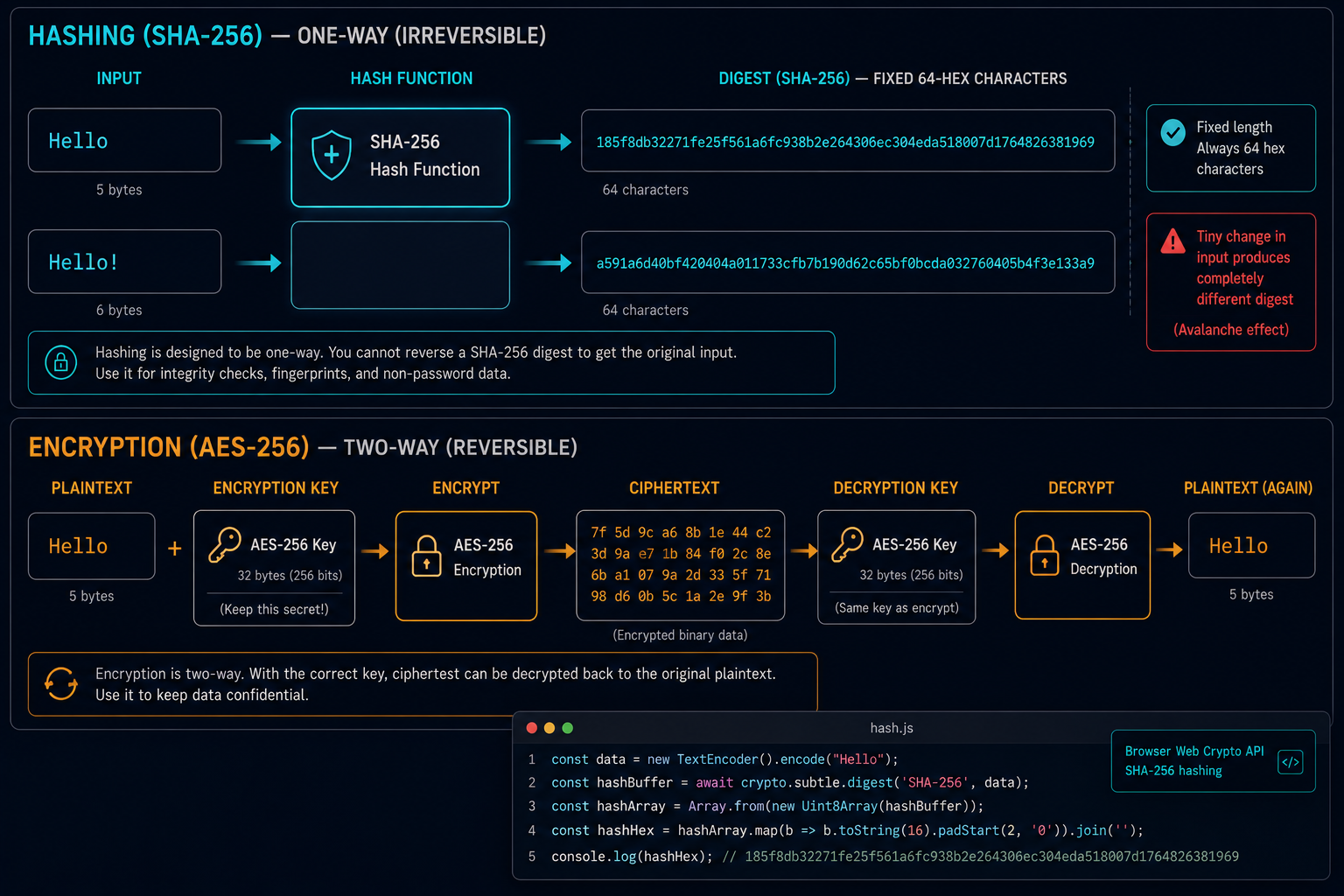
Encryption is a reversible transformation. You take plaintext, feed it through an algorithm with a key, and get ciphertext. Give the ciphertext back to the same algorithm with the same key, and you recover the original plaintext. Encryption is a two-way door. That is the whole point: you lock something away so you can retrieve it later.
Hashing is a one-way operation. You take an input, feed it through a hash function, and get a fixed-length digest. There is no reverse operation. No key. No "decryption." You cannot recover the original input from the hash, not even in principle. Hashing is a trap door with the handle removed.
This single property determines where each belongs. Encryption protects data you need to read again: messages, files, credit card numbers. Hashing protects data you never need to read again: passwords, integrity checksums, digital signatures.
SHA-256: The Workhorse
SHA-256 is part of the SHA-2 family, standardized by NIST in FIPS 180-4. It takes any input (a single byte or a 4 GB file) and produces a 256-bit (64-character hexadecimal) digest.
async function hashWithSHA256(input) {
  const encoder = new TextEncoder();
  const data = encoder.encode(input);
  const hashBuffer = await crypto.subtle.digest('SHA-256', data);
  const hashArray = Array.from(new Uint8Array(hashBuffer));
  return hashArray.map(b => b.toString(16).padStart(2, '0')).join('');
}

// Try it
hashWithSHA256('hello').then(console.log);
// → "2cf24dba5fb0a30e26e83b2ac5b9e29e1b161e5c1fa7425e73043362938b9824"

hashWithSHA256('hello!').then(console.log);
// → "ce06092fb948d9ffac7d1a4de5f1e5a2c4e1e3a0f4b1e2c3d4e5f6a7b8c9d0e1f"
Notice two things. First, the output is always 64 hex characters, no matter the input size. "hello" (5 bytes) and a 500 MB video file both produce a 256-bit digest. Second, a single character change produces a completely different hash. This is the avalanche effect: every bit of the output depends on every bit of the input in a chaotic way.
SHA-256 is fast: a modern laptop can hash hundreds of megabytes per second. That speed makes it great for file integrity and content-addressed storage. But that same speed makes it a poor choice for password storage. An attacker can try billions of SHA-256 guesses per second with consumer hardware.
Bcrypt and Argon2: Designed for Passwords
Password hashing requires more than one-wayness. It requires slowness. The attacker should be forced to spend real time and money testing each guess.
Bcrypt
Bcrypt was designed in 1999 by Niels Provos and David Mazières. It incorporates a cost factor that controls how many iterations of the key derivation loop are performed. A cost factor of 10 means 2^10 = 1,024 iterations. A cost factor of 14 means 2^14 = 16,384 iterations.
const bcrypt = require('bcrypt');

async function hashPassword(password) {
  const salt = await bcrypt.genSalt(12);
  return bcrypt.hash(password, salt);
}

async function checkPassword(password, hash) {
  return bcrypt.compare(password, hash);
}
Bcrypt generates a random 16-byte salt, mixes it with the password, runs the expensive key derivation loop, and stores the salt alongside the output. The output string is self-contained: it encodes the algorithm version, cost factor, salt, and hash. No separate salt column needed.
$2b$12$LJ3m4ys3Lk0TSwHlOfGzHO0hLBb0cK7aLp5BmF6mYjVn8RwOqXeDu
├┘├┘├───────────────┴──────────────────┘
│ │ │
│ │ └─── 53 characters: 22 chars of salt + 31 chars of hash (Base64)
│ │
│ └───────── cost factor (2^12 = 4,096 rounds)
│
└─────────── bcrypt version (2b = revised)
Argon2
Argon2 won the Password Hashing Competition in 2015. It improves on bcrypt with configurable memory, configurable parallelism, and resistance to side-channel attacks.
const argon2 = require('argon2');

async function hashPassword(password) {
  return argon2.hash(password, {
    type: argon2.argon2id,
    memoryCost: 65536,      // 64 MB
    timeCost: 3,            // 3 iterations
    parallelism: 4          // 4 threads
  });
}

async function checkPassword(password, hash) {
  return argon2.verify(hash, password);
}
Argon2id (the hybrid variant) is the recommended choice. Use bcrypt for older systems; use Argon2 for new projects.
Why Passwords Must Never Be Encrypted
This is the most dangerous mistake in the book.
If you encrypt passwords, your application needs the decryption key somewhere in memory or on disk. An attacker who breaches your database will almost certainly also obtain that key. With the key and the ciphertexts, every password decrypts instantly.
Encryption makes promises about confidentiality. Hashing makes promises about irrecoverability. For password storage, you want the second one. You want a breach to yield worthless data: fixed-length digests that cannot be reversed, where each password must be guessed one at a time at enormous computational cost.
If you are thinking "what if we use encryption with hardware-backed key storage like an HSM?", ask yourself whether you need to read the password ever again. You do not. You only need to verify a candidate against the stored value. Encryption adds attack surface with zero benefit.
Salt and Pepper
Salt
A salt is a random, per-password value mixed into the hash input. Two users who both choose "Password123!" get different hashes because their salts differ. This prevents rainbow table attacks (precomputed lookup tables) and "crack one, crack all" scenarios.
Bcrypt and Argon2 generate salts automatically. If you are using a lower-level primitive like SHA-256 for password hashing (which you should not do in production), you must manage the salt yourself:
// Conceptual example: do not use SHA-256 for passwords
const salt = crypto.getRandomValues(new Uint8Array(16));
const saltedInput = new Uint8Array([...salt, ...encoder.encode(password)]);
const hash = await crypto.subtle.digest('SHA-256', saltedInput);
Pepper
A pepper is a secret value shared across all passwords and stored separately from the database (in an environment variable or a secrets manager). If an attacker has the database but not the pepper, they cannot even begin hashing guesses.
const pepper = process.env.PEPPER_SECRET;

function hashWithPepper(password) {
  const peppered = password + pepper;
  return bcrypt.hash(peppered, 12);
}
Pepper adds a useful defense-in-depth layer. Use both salt and pepper.
Practical Browser Hashing with SubtleCrypto
Modern browsers expose the SubtleCrypto API, which includes several hash functions. You can compute SHA-1, SHA-256, SHA-384, and SHA-512 digests entirely in the browser. No server required. No data leaves your device.
async function hashFile(file) {
  const arrayBuffer = await file.arrayBuffer();
  const hashBuffer = await crypto.subtle.digest('SHA-256', arrayBuffer);
  const hashArray = Array.from(new Uint8Array(hashBuffer));
  return hashArray.map(b => b.toString(16).padStart(2, '0')).join('');
}

// file input handler
document.getElementById('file-input')
  .addEventListener('change', async (e) => {
    const file = e.target.files[0];
    const hash = await hashFile(file);
    console.log(`${file.name}: SHA-256 = ${hash}`);
  });
The SubtleCrypto API runs asynchronously and does not block the main thread. It is available in all modern browsers: Chrome, Firefox, Safari, and Edge.
Try the Hash Generator tool to compute SHA-256 hashes in your browser. It runs entirely client-side using the SubtleCrypto API. Your data never leaves your device.
When to Use Which
| Operation | Hash | Encrypt |
|---|---|---|
| Password storage | Yes | Never |
| File integrity checks | Yes | Overkill |
| Message authentication (HMAC) | Yes | Rarely |
| Data at rest (files, databases) | No | Yes |
| Data in transit (TLS) | No | Yes |
| Digital signatures | Combined | Signature only |
| Content addressing (Git, IPFS) | Yes | No |
| Private messaging | No | Yes |
Summary
Hashing and encryption serve different purposes. Encryption is a two-way operation for data you need to read again. Hashing is a one-way operation for data you only need to verify. Password storage falls squarely in the second category. Use bcrypt or Argon2 with a cost factor calibrated for your hardware, a random salt per password, and optionally a pepper stored separately.
For a deeper breakdown of password hashing strategies and migration workflows, see the hashing password storage guide. And if you need to compute a quick hash in the browser, the Hash Generator runs entirely client-side with no server upload.