JWTs Explained: What's Inside a JSON Web Token and How to Decode One Safely
If you've logged into anything on the web in the last decade, you've carried around a JWT. They're the compact, URL-safe tokens that sit in your browser's local storage, in Authorization headers, and in cookies. They tell a server who you are without the server having to look you up in a database on every request.
But most developers treat JWTs as opaque blobs: decode them on jwt.io, check the expiry, move on. There's more going on inside those three dot-separated segments, and understanding the structure helps you avoid common security mistakes.
The Three Parts of a JWT
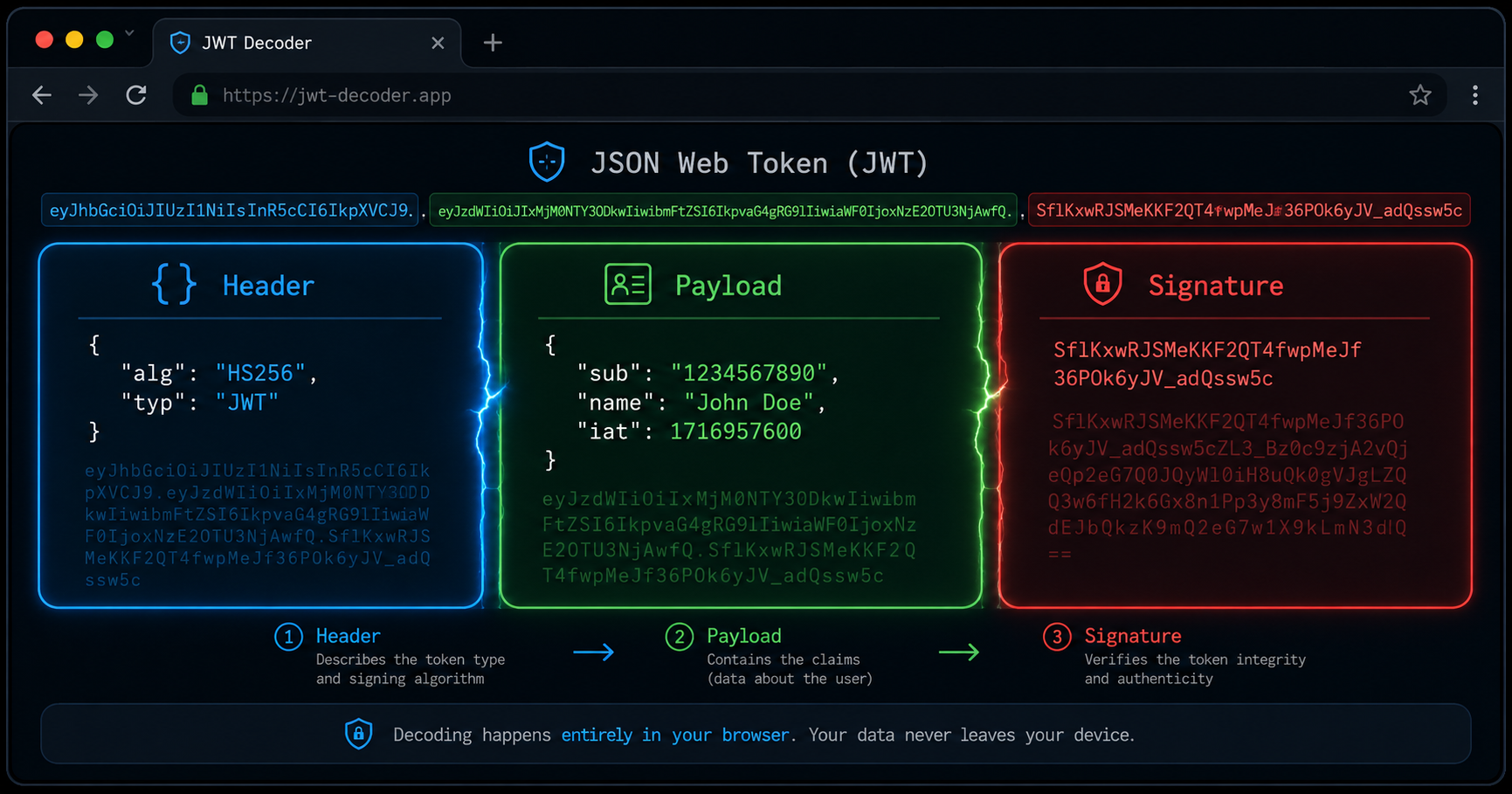
Every JWT looks like this:
eyJhbG...VCJ9
.
eyJzdW...IyfQ
.
SflKxwRJSMeKKF2QT4fwpMeJf36POk6yJV_adQssw5c
Three strings separated by dots. Each is base64url-encoded (it's like base64 but swaps + for - and / for _, and drops the = padding). Let's decode each part.
1. The Header
Base64url-decode the first segment and you get a tiny JSON object:
{
  "alg": "HS256",
  "typ": "JWT"
}
alg tells you which algorithm signed the token. HS256 is HMAC with SHA-256, a symmetric algorithm where the same secret key both signs and verifies. RS256 would be RSA with SHA-256 (asymmetric), and none means no signature at all. The typ field is almost always "JWT", though a few implementations use "JOSE" or omit it.
The header can carry additional fields: kid (key ID, which key from a JWKS endpoint to use), cty (content type for nested JWTs), and custom parameters. Most tokens you'll see in the wild only have alg and typ.
2. The Payload
The second segment is the claims: the actual data the token carries:
{
  "sub": "1234567890",
  "name": "John Doe",
  "iat": 1516239022
}
sub is the subject (usually a user ID), iat is "issued at" (a Unix timestamp), and name is a custom claim. The IANA JWT Claims Registry defines the standard ones: iss (issuer), exp (expiration), nbf (not before), aud (audience), jti (JWT ID, a unique identifier for the token). Custom claims can be anything, but keep them small; JWTs ride in HTTP headers and cookies where every byte counts.
3. The Signature
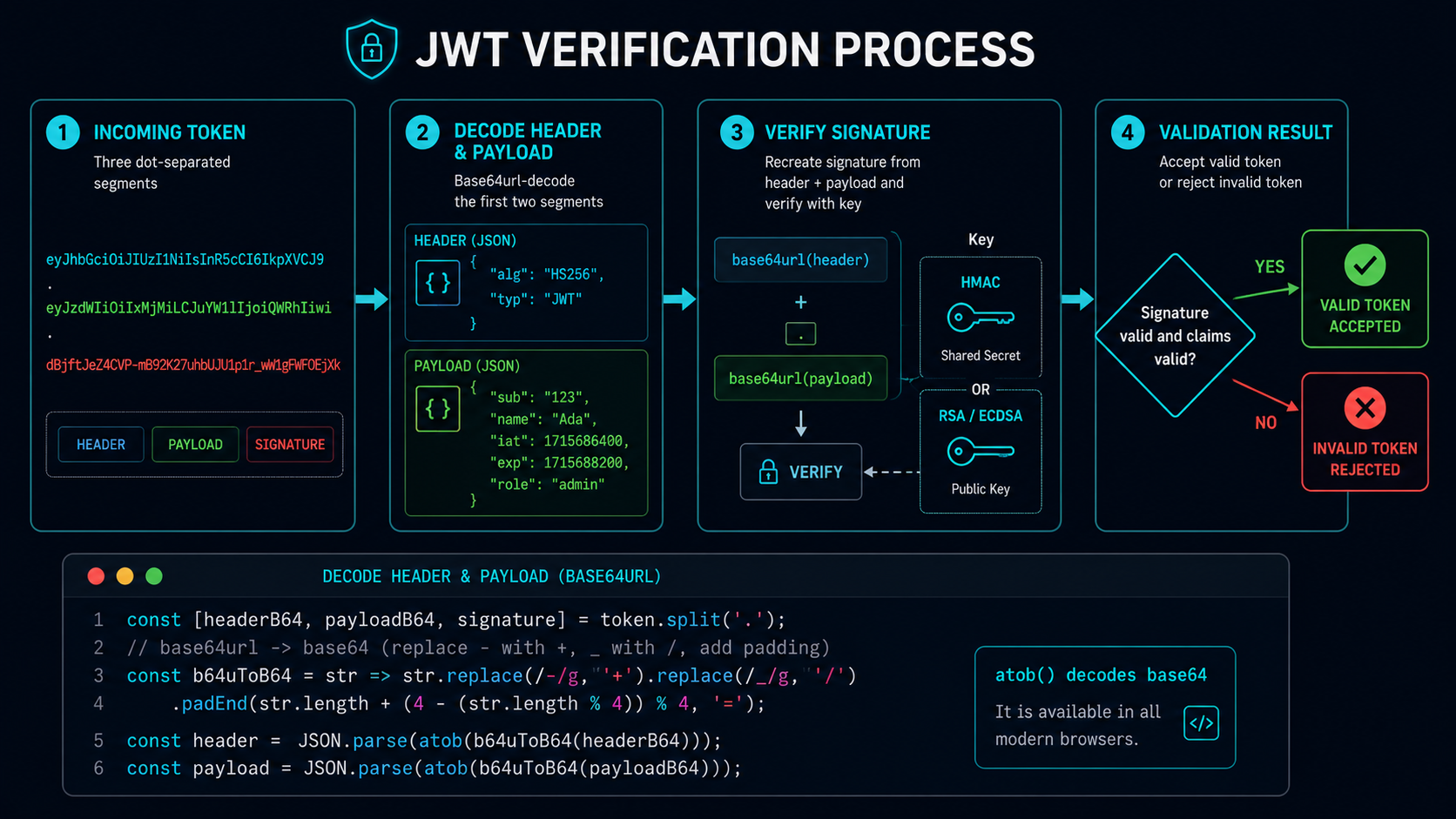
You can't decode the signature into anything readable. It's a cryptographic output: an HMAC hash or an RSA/ECDSA signature over the encoded header and payload joined with a dot. The server recomputes this signature on receipt using the secret or public key. If the recomputed signature doesn't match the one in the token, the token has been tampered with.
This is the core security property: anyone can read the header and payload, but only the key holder can create or verify the signature. JWTs provide integrity and authentication, not confidentiality.
Decoding vs. Verifying
This distinction is where most security mistakes happen. Decoding is just base64url decoding the header and payload. No cryptography, no secrets involved. You can do it with atob() in a browser console:
const token = "eyJhbG...sw5c";
const [header, payload, signature] = token.split('.');
const decodedHeader = JSON.parse(atob(header));
const decodedPayload = JSON.parse(atob(payload));
console.log(decodedPayload); // { sub: "1234567890", name: "John Doe", iat: 1516239022 }
Verifying means checking that the signature matches. That requires the secret key (for HMAC) or the public key (for RSA/ECDSA) and a cryptographic library. Browsers can decode JWTs with zero dependencies; verification needs something like the Web Crypto API or a library.
Why Browser-Based Decoding Is Safer
If you paste a JWT into a random website to decode it, that site now has your token. If the token hasn't expired and the site logs it, someone can replay it, using your token to impersonate you against the service that issued it.
Try our JWT Decoder instead. It runs entirely in your browser: the token never leaves your machine, no network requests are made, and the decoding is done with the same atob() approach you'd use in a console. Same goes for our JWT guide if you want a deeper reference on token lifetimes, key rotation, and the none algorithm attack.
The "none" Algorithm Attack
In 2015, Tim McLean discovered that many JWT libraries would accept tokens with "alg": "none" in the header, meaning the signature segment was empty and the library would skip verification entirely. An attacker could forge any payload, set alg to none, and the server would accept it.
Most libraries have since patched this, but the lesson is broader: never trust the header's alg field alone. Your verification code should have a whitelist of accepted algorithms and reject anything outside that list, regardless of what the token header claims.
Other Things to Watch For
Token replay: A valid JWT is a bearer token. Whoever holds it can use it. Short expiry times (exp claim, 5-15 minutes) combined with refresh tokens limit the blast radius. If someone gets a token, it's only good for a short window.
JWKS endpoint trust: For asymmetric tokens (RS256, ES256), servers fetch public keys from a JWKS endpoint (/.well-known/jwks.json). An attacker who controls DNS or the network path could serve their own keys and forge tokens. Pin certificates and cache keys after first fetch.
Sensitive data in the payload: Remember: anyone with the token can decode the payload. Never put passwords, API keys, or internal system identifiers in JWT claims. The payload is base64url-encoded, not encrypted. If you need confidentiality, use a JWE (JSON Web Encryption) which encrypts the payload, but browser support for JWE is limited and the complexity is higher.
When JWTs Make Sense
JWTs shine in distributed systems: a token issued by an auth service can be verified by any other service that has the public key, without those services needing to call back to the issuer on every request. This is why OAuth 2.0 and OpenID Connect use them heavily.
They're less useful for traditional session-based apps where a server-side session store already exists. A random session ID in a cookie, looked up in Redis, is simpler and lets you revoke sessions instantly without managing token blacklists.
JWTs are a tool. They solve a specific problem (stateless, distributed authentication) and bring their own trade-offs. Knowing what's inside them and what can go wrong is the difference between using them well and shipping a vulnerability.
Quick Reference
| Claim | Name | Purpose |
|---|---|---|
iss |
Issuer | Who issued the token |
sub |
Subject | Who the token is about (user ID) |
aud |
Audience | Who the token is for |
exp |
Expiration | When the token stops being valid (Unix timestamp) |
nbf |
Not Before | When the token starts being valid |
iat |
Issued At | When the token was created |
jti |
JWT ID | Unique identifier to prevent replay |
Decode safely. Verify the signature. Don't trust the alg header field blindly. And never paste a live token into a website you don't control.