URL Encoding Demystified: Why Spaces Become %20 and How to Handle It
Updated
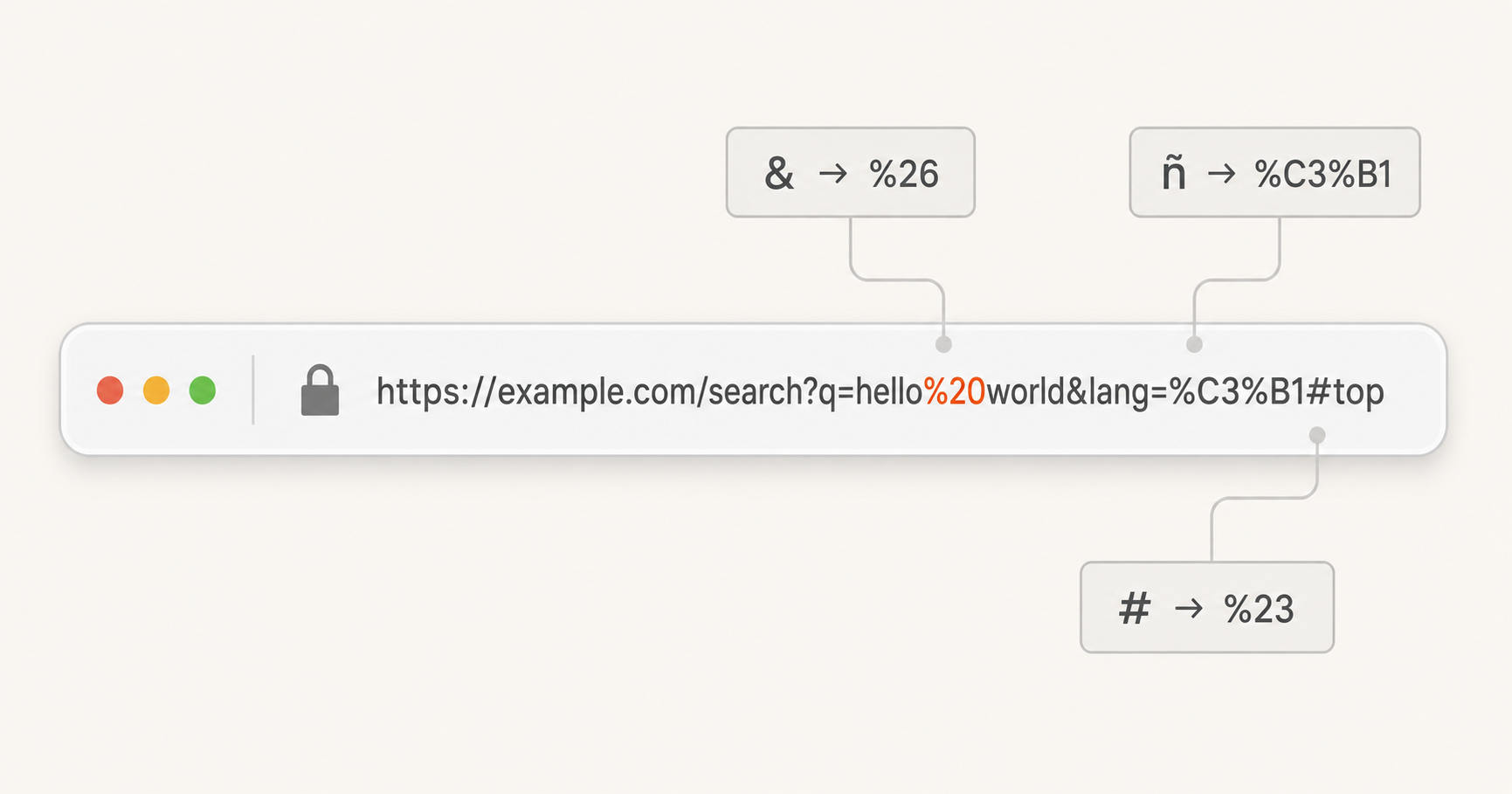
Every web developer has seen a URL like this:
https://example.com/search?q=hello%20world&category=programming%26tech
Those %20 and %26 sequences are URL encoding (also called percent-encoding). They're the browser's way of including characters that have special meaning in URLs (spaces, ampersands, hashes, and non-ASCII characters) without breaking the URL's syntax.
But URL encoding is surprisingly nuanced. Not all characters are encoded the same way in every part of a URL, and JavaScript's built-in encoding functions have behaviours that frequently surprise developers. Let's break it down.
Why URL Encoding Exists
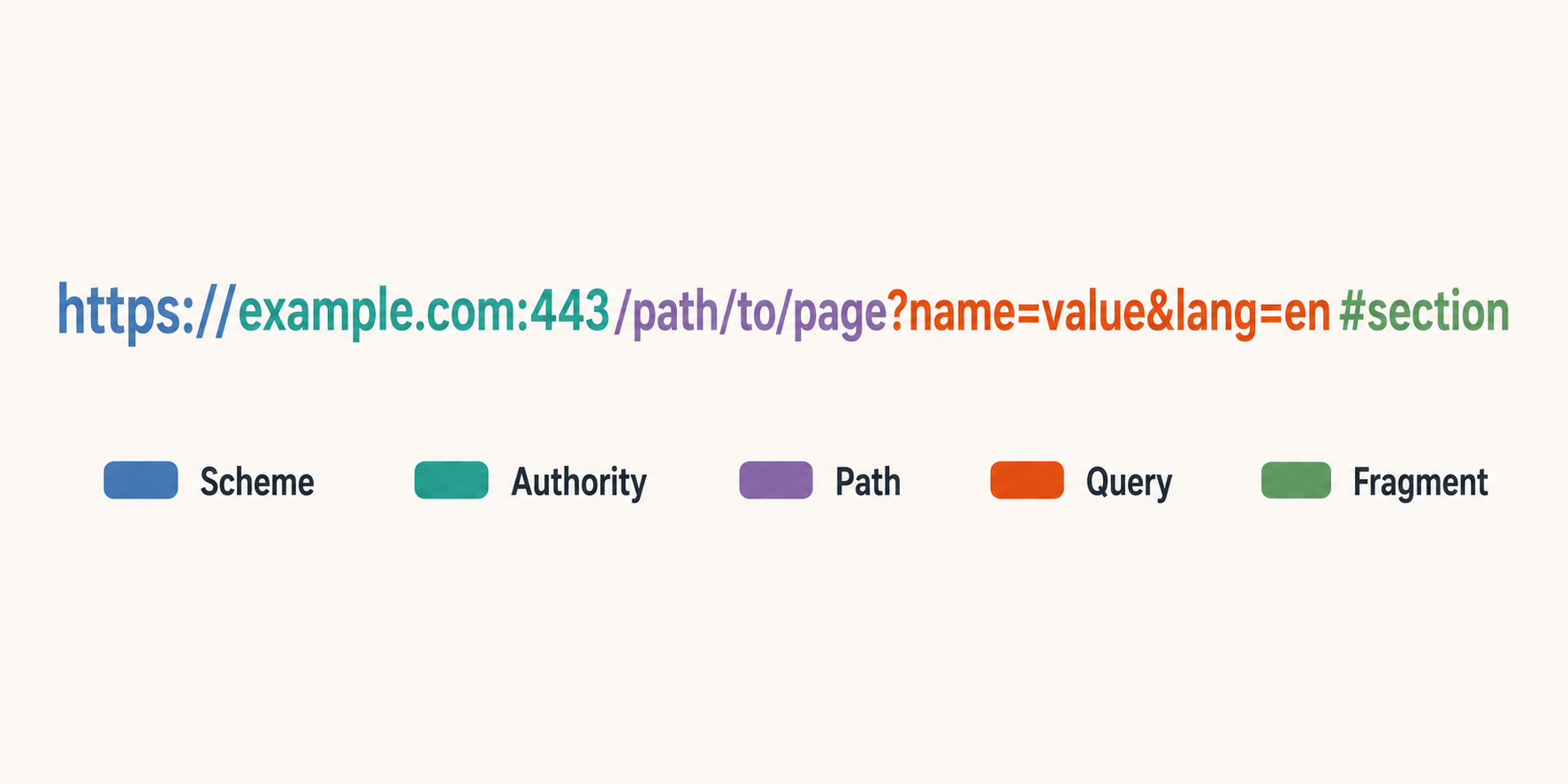
A URL has a strict structure defined in RFC 3986:
scheme:[//authority]path[?query][#fragment]
Each component allows a different set of "unreserved" characters. Everything else must be percent-encoded: replaced with % followed by its two-hex-digit byte value.
For example, a space character (code point 32, hex 0x20) becomes %20. An ampersand (&, hex 0x26) becomes %26. Non-ASCII characters like ñ (code point 241, hex 0xF1) become %F1 in Latin-1 or %C3%B1 in UTF-8.
The fundamental rule: If a character could be misinterpreted as part of the URL structure itself, it must be encoded. If you include a literal & in a query parameter value without encoding it, the URL parser will treat it as the separator between parameters.
Path Encoding vs. Query Encoding
A common source of confusion is that path segments and query strings have different reserved characters.
| Component | Reserved characters | Key difference |
|---|---|---|
| Path segment | : @ ! $ & ' ( ) * + , ; = |
Forward slash / is reserved as segment separator |
| Query string | : @ ! $ ' ( ) * , ; |
Ampersand & and equals = are reserved as parameter separators |
This means a / character in a query parameter value should be left as-is (it's not special in the query component), but a / in a path segment must be encoded as %2F if it's meant as literal data, not a path boundary.
Similarly, & and = in query strings must be encoded as %26 and %3D respectively, but they're perfectly valid literal characters in path segments.
JavaScript's Encoding Functions: A Cautionary Tale
JavaScript provides three URL encoding functions, and choosing the wrong one is a common source of bugs:
encodeURI(): Encodes a Complete URI
encodeURI('https://example.com/search?q=hello world&lang=en')
// "https://example.com/search?q=hello%20world&lang=en"
encodeURI() assumes the input is a complete, well-formed URI. It encodes all characters except those that are valid in a URI (A–Z, a–z, 0–9, ; , / ? : @ & = + $ - _ . ! ~ * ' ( ) #). Crucially, it does not encode ?, &, =, or #; so you should never use this to encode a query parameter value, because it will leave & unencoded.
encodeURIComponent(): Encodes a URI Component
encodeURIComponent('hello world & more')
// "hello%20world%20%26%20more"
encodeURIComponent() assumes the input is a single component of a URI (like one query parameter value). It encodes all characters except A–Z, a–z, 0–9, and - _ . ! ~ * ' ( ). This is always the right choice for encoding individual query parameter names and values.
The Pitfall: escape() (Deprecated, Never Use)
The old escape() function exists in browsers for legacy compatibility but should never be used in new code. It uses a non-standard encoding scheme (not RFC 3986), handles Unicode incorrectly, and has inconsistent behaviour between browsers.
The Golden Rule
Use encodeURIComponent() for parameter values.
Use encodeURI() for full URLs (rarely needed).
Never use escape().
Real-World Examples
Building a Query String
function buildQueryString(params) {
  return Object.entries(params)
    .map(([key, value]) =>
      `${encodeURIComponent(key)}=${encodeURIComponent(value)}`
    )
    .join('&');
}

buildQueryString({
  q: 'hello world & more',
  lang: 'en',
  page: 1
});
// "q=hello%20world%20%26%20more&lang=en&page=1"
Encoding a Path Segment
Path segments need care because encodeURIComponent() encodes / as %2F, which is correct for literal data in a path segment:
const filename = 'report 2024/05/final.pdf';
const path = `/downloads/${encodeURIComponent(filename)}`;
// "/downloads/report%202024%2F05%2Ffinal.pdf"
Handling a Redirect URL
A common pattern is passing a redirect destination as a query parameter:
const redirectTarget = 'https://example.com/dashboard?tab=settings';
const url = `https://auth.example.com/login?redirect=${encodeURIComponent(redirectTarget)}`;
// "https://auth.example.com/login?redirect=https%3A%2F%2Fexample.com%2Fdashboard%3Ftab%3Dsettings"
Notice the entire redirect URL (including its scheme, domain, path, and query string) is safely encoded as a single parameter value.
Common Pitfalls
Double-Encoding
If you encode an already-encoded string, %20 becomes %2520 (because % itself gets encoded as %25). Always check whether the value has already been encoded before applying another round:
// BAD: double encoding
encodeURIComponent(encodeURIComponent('hello world'))
// "hello%2520world"

// GOOD: encode once
encodeURIComponent('hello world')
// "hello%20world"
Encoding the Entire URL
If you feed encodeURIComponent() a full URL, it will encode the :// and the path separators, breaking the URL completely. Always encode individual components, not the whole thing.
Assuming + Means Space
Some applications (notably application/x-www-form-urlencoded form posts) interpret + as a space. But in standard URL encoding, a space should be %20. Modern frameworks handle both, but be aware of the legacy quirk when decoding query strings by hand.
URL Encoding in Practice
Most modern web frameworks handle URL encoding automatically. Fetch API encodes query strings correctly, Express decodes path parameters automatically, and the URL API handles both encoding and decoding:
const url = new URL('https://example.com/search');
url.searchParams.set('q', 'hello world & more');
url.searchParams.set('page', '1');

console.log(url.toString());
// "https://example.com/search?q=hello+world+%26+more&page=1"
Note that URLSearchParams uses the application/x-www-form-urlencoded convention (spaces as +), which is compatible with most servers. Our free URL Encoder and URL Decoder handle both standard percent-encoding and the + convention so you can inspect and debug URLs from any source.
The Takeaway
URL encoding isn't complicated once you understand the core principle: characters that have special meaning in a URL must be encoded when they appear as data. The devil is in the details (which characters are reserved where, and which JavaScript function to use), but the rules themselves are well-defined in RFC 3986.
Next time you see %20 in a URL, you'll know exactly what it is: a space character that's being a good URI citizen.
Quick Reference
| Operation | Right Tool | Wrong Tool |
|---|---|---|
| Encode a query parameter value | encodeURIComponent() |
encodeURI() |
| Decode a query parameter value | decodeURIComponent() |
decodeURI() |
| Encode a full URL for a link | encodeURI() |
encodeURIComponent() |
| Build a query string | URLSearchParams or manual encodeURIComponent |
String concatenation with & |
Decode + as space |
Replace + with space after decodeURIComponent |
Direct decodeURIComponent |
Our URL Encoder and URL Decoder tools let you experiment safely; both run entirely in your browser with zero server interaction.